Making more time for design
A few thoughts on AI, automation and the tools I am building for myself.
Author: Alptekin Canatar
I have worked in graphic design for over a decade. During that time, the software we use, our production habits and our clients’ expectations have changed considerably. The arrival of AI in our daily lives has made that change much more visible, especially over the past few years.
Today, creating a single image may take less time than it used to. We can explore different compositions from an idea, reimagine product photographs and sometimes complete technical tasks that once took hours in just a few minutes.
But something else kept coming to mind in everyday agency life: how much of a designer’s day is actually spent designing?
Updating prices for dozens of products in a campaign, placing their images, changing the copy, preparing exports in different sizes… All of these are part of the job. As the number of clients and the workload grow, these small tasks start to consume a significant amount of time.
After repeating the same tasks over and over, I began asking myself: Why am I still doing all of this one item at a time?
Repetitive tasks and lost time
Anyone who has worked in an agency knows the situation. You might be working on a promising idea when an urgent price change comes in. Then a new product is added, a campaign date changes or someone requests dozens of versions of an existing design in different sizes.
Most of these tasks do not require a creative decision. They still demand attention, though. A mistyped price, a missing product image or a forgotten export can disrupt the whole process.
That is exactly where the idea of automation began for me.
Could I adapt the tasks I do frequently to my own way of working, inside the Adobe tools I already use every day? Could I keep creative control of a design while handing its repetitive parts over to software?
At first, these were small experiments. Over time, they became two separate plugin projects, both born out of my own needs.
Furious Insert Creator: from a product list to a campaign design
One of the most time-consuming parts of retail and supermarket campaigns is preparing promotional leaflets. You have dozens of products, each with a brand, a name, a price, an image and sometimes a promotional label. All of them need to come together within a defined layout.
To make this process easier, I started developing Furious Insert Creator for Adobe InDesign.
The basic idea was simple: if the product information already exists in a spreadsheet, why should I place the same information manually all over again?
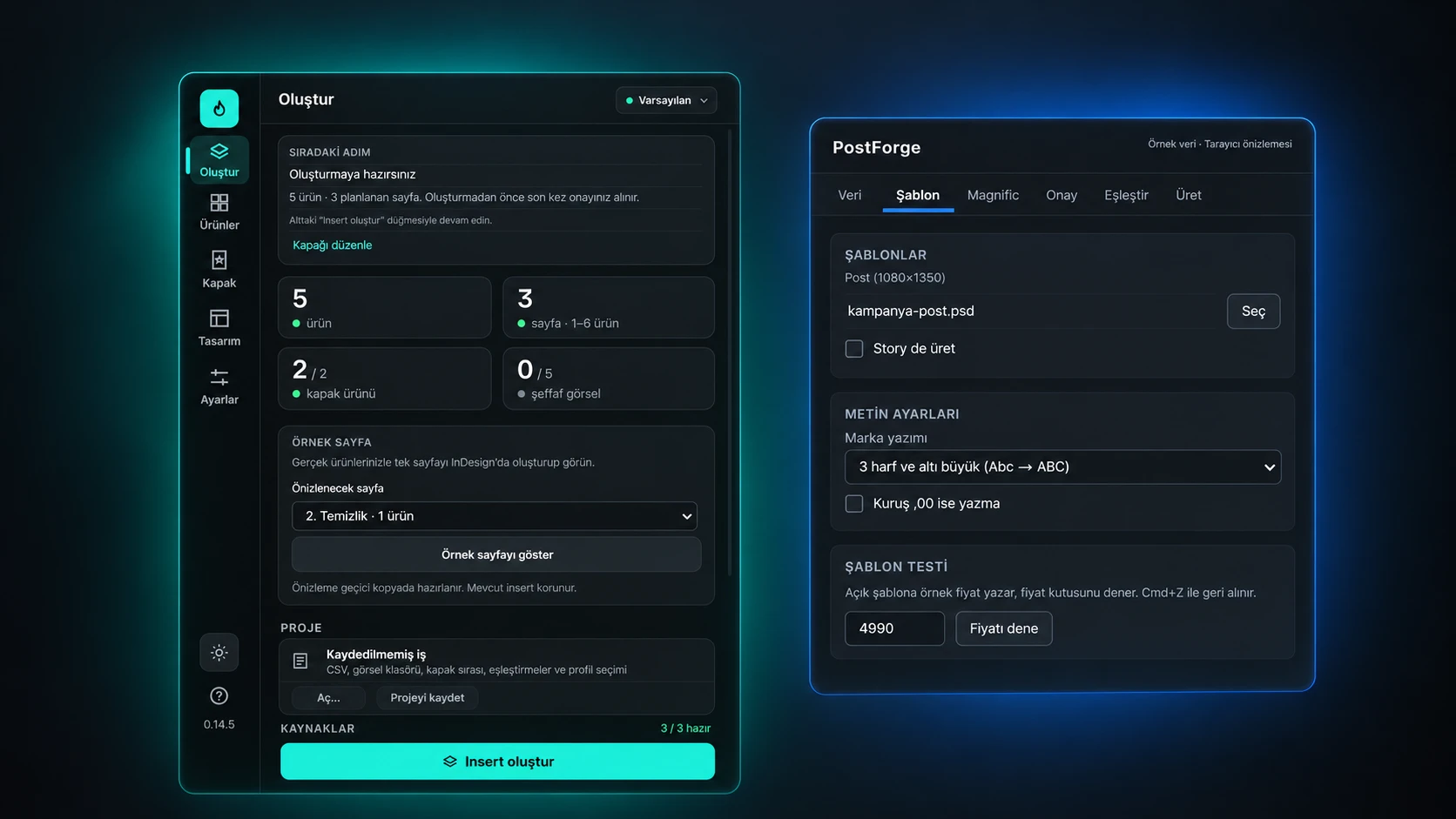
The plugin is intended to take product information from a CSV file, match it with images and place it into prepared InDesign templates. You can manage the products that appear on the cover, page layouts, price typography and promotional badges from a single panel.
Identifying missing images in advance and preparing layouts for different numbers of products were particularly important to me. On a busy day, you sometimes only realise an image is missing when you review the design.
The plugin is still in development. I continue to improve its interface, workflow and production checks around real usage needs.
For this project, I create the visual design in InDesign. The plugin’s job is to manage the data and repetitive placement tasks within that design.
PostForge: from one design to dozens of assets
There was a similar need on the Photoshop side.
Social media campaigns with many products often require dozens of different posts that share the same visual language. The product changes, the price changes, perhaps the brand or description changes too. But the overall structure of the design stays the same.
PostForge is the Photoshop plugin I am developing to address this need.
It aims to make batch post production easier by placing product information and photographs into a prepared PSD template. It can work with post and story formats, and creating editable PSD files alongside JPG exports is also part of the workflow.
One aspect of the project that interested me was the possibility of bringing image generation tools into this process.
For example, instead of using a standard product photograph, an AI-assisted tool can create a lifestyle scene. The Magnific integration I am developing in PostForge was designed for this purpose. There is a separate workflow for reviewing generated images, approving them and matching them with the right product.
Keeping a human in control is particularly important to me here. An AI-generated image may look impressive at first glance, but it might have changed the product’s packaging, logo or physical characteristics. These are things you cannot afford to overlook in commercial design.
PostForge is also going through early development and validation. The problems I encounter in everyday production guide the features I add.
Developing software with AI
Before starting these two projects, my daily work mostly revolved around graphic design software. My knowledge of software development was not at the level of a professional developer.
This is where AI-assisted coding tools became most interesting to me.
I can describe a workflow I have in mind, explain the problems I encounter and try to develop working solutions from there. Of course, the process is not simply a matter of typing a prompt and receiving a perfect plugin.
There have been features that did not work, unexpected errors, technical limitations in Adobe applications and interfaces I changed repeatedly. There still are.
Trying to fix a small feature only to find that another part has broken has become a familiar experience.
This process has taught me new things about software development. More significantly, I have started looking differently at the problems I encounter when designing.
I used to accept that a task taking a long time was a natural part of the workflow. Now, when I encounter the same task, I wonder whether there is a better way to do it.
Do we have to speed everything up?
When we talk about AI and automation, we keep talking about speed. Producing more content in less time, turning around revisions faster, preparing more alternatives…
I see the benefits of these things in my own work. Still, I do not think speed alone produces good design.
Sometimes you need to spend a long time working on a design. Finding the right typography, building the visual hierarchy or understanding why an idea is not working can take time. Trying to speed these things up does not always lead to a better result.
AI tools also have their own problems. A generated image can be technically impressive without fitting the brand’s identity. An automatically assembled page can follow every rule and still feel visually unbalanced.
That is why I care about leaving the final adjustments to the designer in the tools I build. Being able to change the work produced by automation when necessary is an important part of how I work.
Is the designer’s role changing?
I think it is. In fact, it had been changing for some time; AI has made that process more visible.
Today, it is becoming harder for a graphic designer to get by on knowing how to use Photoshop or Illustrator alone. Understanding image generation technologies, combining different tools and improving your own processes are becoming part of the profession too.
Still, I do not think every designer needs to develop software. Every designer has different needs and interests.
For me, building these tools grew out of looking for solutions to the problems I face in my daily work. My design background helps me understand what I need. AI-assisted development tools have given me room to experiment with those ideas.
For now, that is what I enjoy most about it.
Where I once waited for a piece of software to offer a particular feature, I can now try building that feature myself. Not every attempt succeeds, but I learn something from most of them.
What comes next
I am continuing to work on Furious Insert Creator and PostForge. Both grew out of needs I encountered in my own production processes, and neither is a finished product yet.
Over time, I want to develop other tools, make the existing ones more useful and share what I learn along the way.
That is also why I use the Lab section on alptekvn.com. It brings together the plugins I am developing, small experiments and tools for everyday workflows.
The way I design has changed considerably in recent years. I still open the same programs, deal with similar problems and sometimes spend more time than I should on the smallest detail.
But now I spend some of that time building things that might keep me from facing the same problem again on the next job.
Let’s see where these experiments lead.